
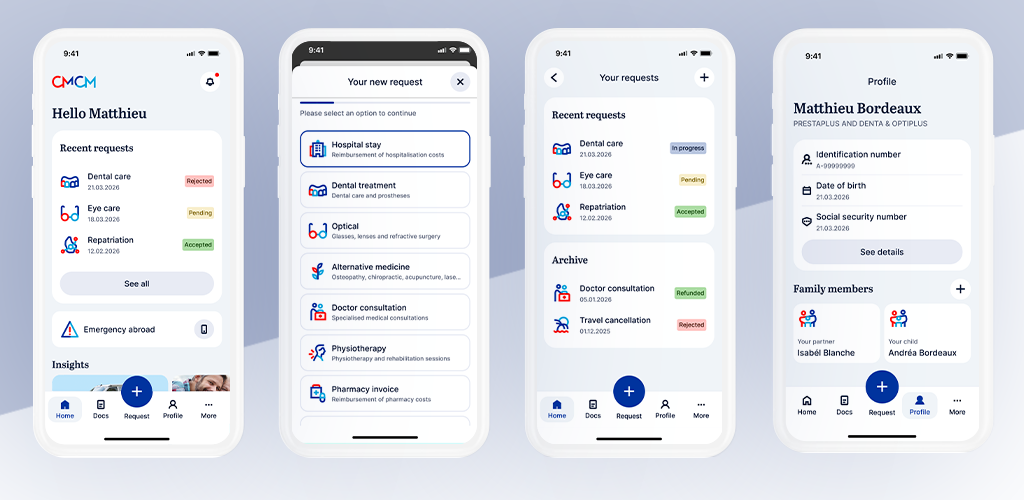
myCMCM is your secure personal space, allowing you to easily manage all your CMCM services online. Accessible at any time from your smartphone or computer, it centralises all your requests in one place.
With myCMCM, you can submit and follow your reimbursement requests, consult your documents, update your personal data and quickly access your CMCM services, all in a simple and secure way. In addition, you have the opportunity to share your experience related to an emergency by simply completing an online questionnaire.
How to access it?
- Go to my.cmcm.lu or download the myCMCM app
- Open myCMCM and click "Activate my access"
- Verify your identity with IDnow
- Set up your access and start using myCMCM
Once your access is set up, you can start using myCMCM immediately.
Features
Manage your reimbursements easily
Submit your requests online and follow their status in real time.
Less paperwork, more simplicity.
Access your documents anytime
Find all your important documents in one place:
- Certificates
- Statements
- Membership documents
Your personal CMCM space
Update your information and manage your account securely.
Available 24/7
Access your services from your smartphone or computer whenever you want.
Download the App
Apple Store
Google Play Store
FAQ
Can I use myCMCM on a computer?
Yes, via your browser at my.cmcm.lu.
How do I submit a reimbursement request?
Upload your documents via the app or web version and follow your request online.